Space Academy: Weekly Update — 41 Textbook Pages, a Live Ruler, and a Windows Guard
This is an adapted English version. Original (Russian): automata.sale/blog/ai-automation/kosmoakademiya-obnovlenie-lineyka-i-strazh/

A week ago I wrote about Space Academy, the AI trainer built on my second-grader’s actual school textbooks. In one week the project went from “young demo” to a working daily system: 41 pages of two textbooks, 199 tasks, 214 check questions, plus a Windows guard that keeps the fun away until the daily quota is done. Here is what was added, and the decisions behind it.
Update, Oct 21. The numbers in this piece were frozen at update time (Oct 7). Since then the textbooks have been entered much further: math (Moro, grade 2) is complete through p. 110, Russian (Kanakina) through p. 129, with the quality gate passing on Oct 12. Nothing architectural has changed since — everything below works as described.
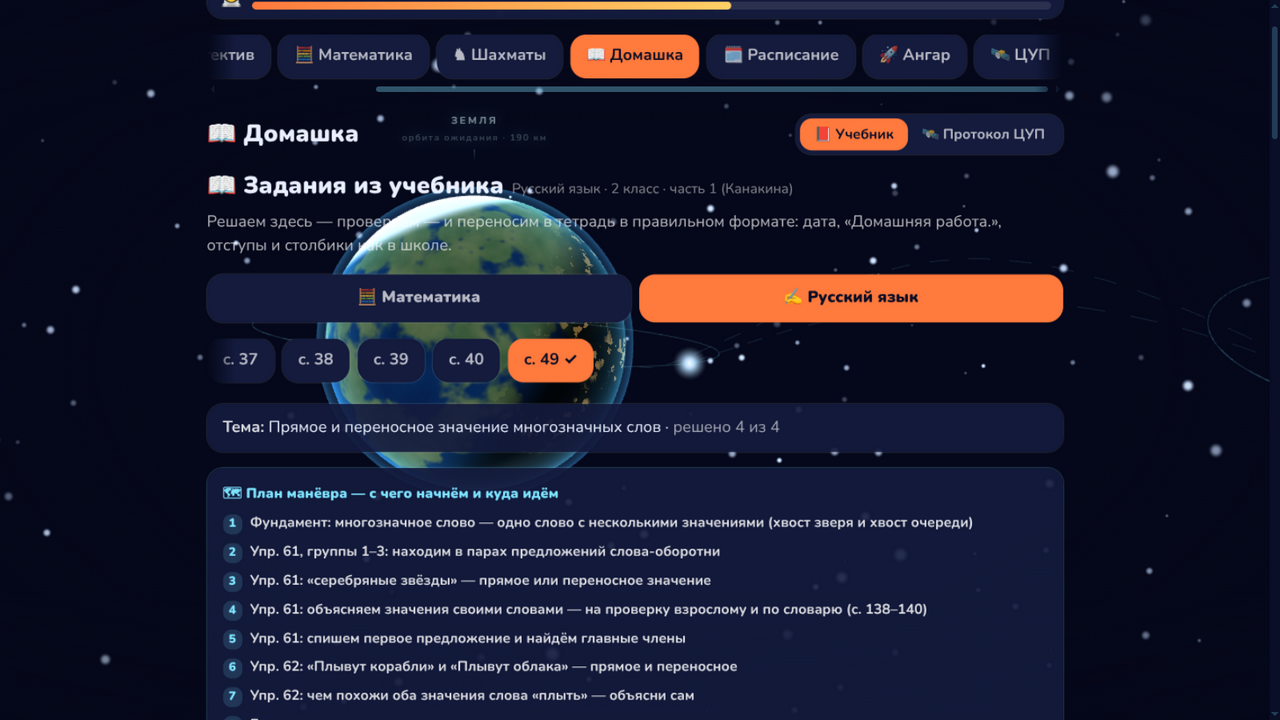
Textbooks: from 13 pages to 41, and not one invented number
The trainer now covers math (Moro, grade 2, pp. 4–35) and Russian (Kanakina, pp. 37–58): word problems, inverse problems, time, polyline length, synonyms, antonyms, related words. The pipeline rule hasn’t changed: no task enters the database without scan verification against the printed textbook. An agent reads the PNG scan of a page, compares wording and answers against the breakdown, and only then assembles the cards.
That produced the most interesting decision of these weeks. Where an answer can’t be checked honestly and automatically (clock readings on a small dial, ruler measurements), a card is deliberately built without a reference answer: the child enters their own result marked “for an adult to check”, with the calculation format in the hint. Feeding unverified numbers into a solver is worse than giving no answer at all.
The second hard filter is the deploy gate. A page without a “mission plan” (the route of the lesson from base to goal) and without motivation for every task does not deploy at all: the pipeline fails at build time. The learn method (probe → plan → teach) is baked into the infrastructure, not into a prompt.
Checking without order, and errors with personality
Some nuances came from live operation. It turned out that “pick four correct inequalities out of six” is a set, not a sequence: checking is element by element, the order of answers doesn’t matter. Answer phrases got a personal reaction to mistakes: when a child mechanically drops an antonym from the wrong sense of the word into the pair “shallow pond — shallow rain”, the trainer doesn’t say a generic “wrong”, it says “Rain is never deep — here ‘shallow’ is about drop size”.
The nicest new mechanic is circular examples. Eight shuffled cards without answers; the child computes in their head and picks the one that starts with the current number. Each answer is the first number of the next card, and when the last card loops back to the start, the circle closes and the task credits itself. A mistake is visible on the way, no “check” button needed: the wrong card simply doesn’t snap into the chain.
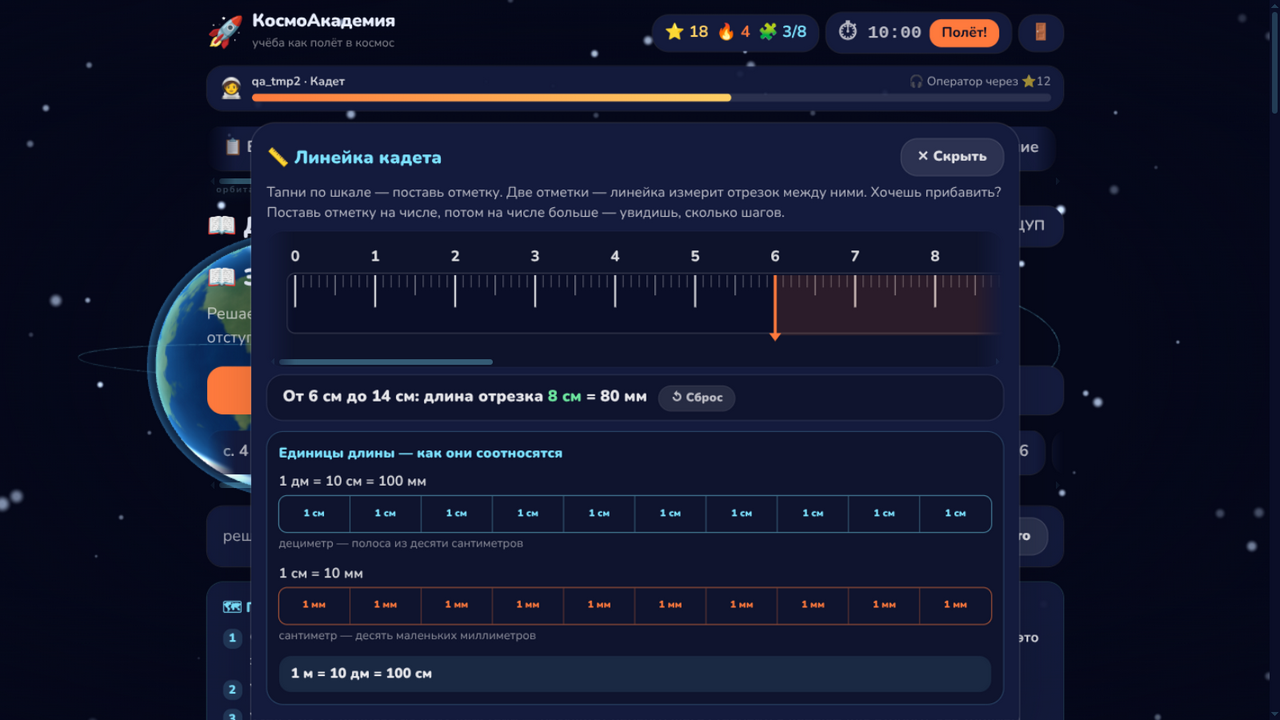
Tools, not just cards
- The cadet ruler. Every math page has a ”📏 Ruler” button: a drawer slides up from the bottom (the task above stays visible) with a real 30 cm ruler, millimeter ticks, and scrolling like a physical one. Two taps on the scale and the ruler shows the segment itself: “from 6 cm to 14 cm — length 8 cm = 80 mm”. Below that, visual units: a decimeter made of ten centimeters, a centimeter made of ten millimeters.
- Textbook page scan. The original page opens in the app with one button, so cross-checking against the book never leaves the task. The API serves scans only after login: without a session the server returns 401, so the copyrighted material never leaks out.
- Photo report. The ”📸 Photograph the page” button captures the whole finished page in one tap: on a phone the system share sheet opens right away, and sending it to a parent takes two seconds.
SpaceLocker: the desktop guard
The final piece of the system is SpaceLocker, the Windows gatekeeper. The deal is honest: until the daily quota is done, Steam and Roblox get closed and YouTube won’t open. The parent sets the quota: a subject and pages for the day (“math, p. 36”). Try to launch a game, and a ”🚀 Refuel your rocket first” screen appears over everything with progress — “3 of 8 solved” — and two buttons: “Open the trainer” and “I did it — check”. The X button and Alt+F4 do nothing; only a finished quota or the parent PIN closes it.
Technically it’s one self-contained C# application (a single exe, no dependencies to install): a process monitor every 15 seconds, YouTube blocked through hosts with marker lines, and homework status fetched from the Space Academy API under the cadet’s session. Quota done — free until the end of the day; tomorrow the block comes back by itself.
What it gives the family, and what it gives engineers
For the family it closes three pains at once: “won’t do homework” (lesson structure and motivation inside every task), “gaming until homework” (a guard instead of an endless argument), and “how do I check it’s actually done” (progress on the server plus a one-tap photo).
For engineers, the interesting part is not EdTech, it’s the pipeline: scan → agent-side verification → data with a quality gate → deploy → a client guard on another platform. The Windows binary builds from Linux with one command (dotnet publish -r win-x64 --self-contained), and the cross-posting of this article is a pipeline too. One person with agents keeps the pace that used to take a team.
The project is personal, not a SaaS: I’m showing the architecture and the decisions, not selling access. If you want a breakdown of the textbook verification agent or the method gate in the deploy pipeline, ask, and I’ll turn it into a separate article.
If you are building something like this for your kids, or want this kind of agent pipeline for your business, write to me, let’s trade notes.
Phone: +7 (906) 311-77-69, email: hello@automata.sale, Telegram: @automatasale, site: automata.sale
Evgeny Uryadov, sole proprietor (INN 645112058391, OGRNIP 312645301900058). Working across Russia, Belarus and Kazakhstan.
Frequently asked questions
Where do the exercises come from? Doesn't the AI just invent them?
No. A page only enters the app after scan-based verification against the printed textbook: wording and answers are checked against a PNG scan. Anything a scan can't confirm honestly (like clock hands on a small dial) deliberately ships without a reference answer, marked 'to be checked by an adult'. The deploy physically fails without a lesson plan and motivation per task — a separate gate in the pipeline checks that.
How does SpaceLocker block games and YouTube?
Steam and Roblox are killed by a process monitor every 15 seconds, after which a fullscreen screen with homework progress appears. YouTube is blocked through the system hosts file until the daily quota is done. The screen can only be closed by finishing the quota or entering the parent PIN.
What about textbook copyright?
Page scans are not in a public folder: the API serves them only after login, and without a session the server returns 401. Task cards use our own wording based on the breakdown; the scans exist so the child can cross-check against the paper book.
Who sets the daily homework quota?
The parent. In the guard's settings you pick a subject and pages for the day, for example 'math, p. 36'. The quota lasts until midnight: finish it, and Steam, Roblox and YouTube open for the rest of the day; tomorrow the block comes back on its own.
Read next
I Gave My CRM a Second Brain: Adopting obsidian-second-brain (With a Command Cheat Sheet)
I adopted obsidian-second-brain in Automata CRM: an ADR log, a Folder Map, and four agent commands. Inside: a cheat sheet for osb-save, osb-health, osb-reconcile, osb-decide.
Skills in ZCode: Turning Working Rituals into Commands Your AI Agent Follows
How skills work in ZCode: invoke with /commands or plain language, install third-party sets safely, write your own. A practical guide from my agency's pipeline.
Space Academy: an AI Tutor Built From a Real School Textbook, One That Teaches Instead of Solving
How I built an AI-powered trainer on top of my second-grader's actual textbook: scan-verified content, the learn method, an LLM mentor that never gives the answer, and a bridge to the paper notebook.